Roblox Update Icon Maker
Upload your current game icon, pick a label such as UPDATE, NEW or EVENT, choose a style and color, and download a 512×512 PNG ready to upload as your game icon. It runs in your browser and needs no account.
Stays in your browser. Non-square images are center-cropped.
How to use it
- 1
Add your icon
Choose your current icon. Any image works; non-square images are center-cropped to a square.
- 2
Pick a label
Use a preset or type up to 12 characters, then pick a corner ribbon, banner or sticker and a color.
- 3
Download and upload
Download the 512×512 PNG and upload it as your game icon in the Creator Dashboard.
Why top games mark their updates
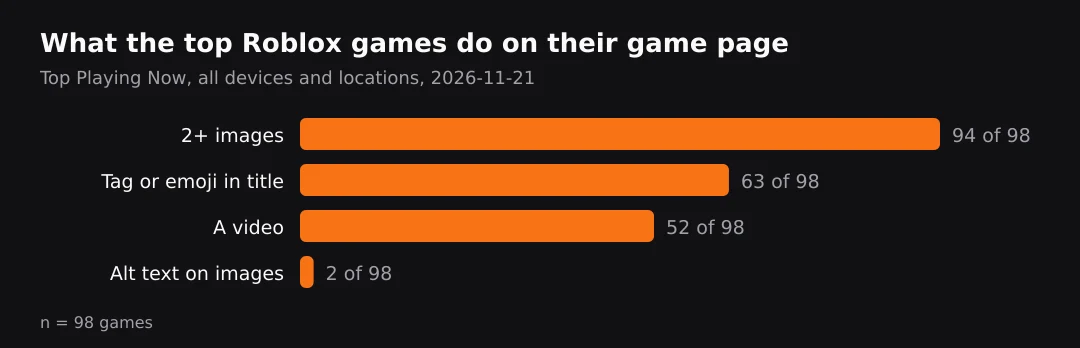
On 21 November 2026, 63 of the 98 games in Roblox's Top Playing Now chart had a bracketed tag such as [UPD] or [EVENT], or an emoji, in their title. A label on the icon carries the same message to players who skim past titles.
An update label tells returning players there is something new without them opening the game page. It works best together with a title tag and new thumbnails.
Which style to choose
All four styles keep the label large enough to read at 150 pixels, the size Roblox scales icons down to.
| Style | Best when | Watch out for |
|---|---|---|
| Corner ribbon | The subject is centered and the top-right corner is background | Covers part of the corner art |
| Top banner | The subject sits low in the frame | Hides the top fifth of the icon |
| Bottom banner | The subject sits high, such as a face | Hides the bottom fifth |
| Sticker | You want the label to look like a badge | Long words shrink; keep it short |
Rules to keep in mind
Roblox asks for game icons of at least 512×512 and moderates every new icon before players see it. Developers have reported that players can see a pending placeholder during review, so upload the update icon a few hours before the update goes live rather than at launch.
- Keep the old icon file so you can switch back after the event.
- Remove the label when the update is no longer new; a permanent UPDATE label stops meaning anything.
- Use the same word in the title tag and on the icon.
- Game pass and badge icons are shown in a circle: do not put a corner ribbon on those.
Need new art?
Describe your game and get up to five differently composed thumbnails or icons, already at Roblox's upload sizes. New accounts get 5 free credits.
Make thumbnails with AIFrequently asked questions
More Roblox tools
- Thumbnail Maker5 test-ready thumbnails at 1920×1080
- Game Icon MakerSquare 512×512 icons for your game
- GFX MakerRendered-style scenes without Blender
- Avatar GFX MakerUse a public Roblox username as your GFX reference
- Gamepass Icon MakerIcons composed for the circular crop
- Badge Icon MakerAchievement badges that survive the crop
- Group Icon MakerEmblems for groups and studios
- Game Logo MakerStylized title lettering for your game
- Thumbnail Size CheckerCheck and fix a thumbnail for free
- Icon Size CheckerSizes for game, pass, badge and group icons
- Thumbnail PreviewSee your art on Home, on a phone and at icon size
- Game Icon DownloaderDownload a game's icon and thumbnails and check its page
- Free Gamepass Icon Pack10 free circular 512×512 PNG gamepass icons ready to upload
- Thumbnail TemplatesStarting points for popular genres
- ExamplesThumbnails and icons made by other developers