Roblox Thumbnail Not Showing or Not Changing? Causes and Fixes
Why a new Roblox game thumbnail does not appear, stays the old one, or fails with "Upload image failed", and what to do about each case. Includes the exact error text and the two-tab trap.
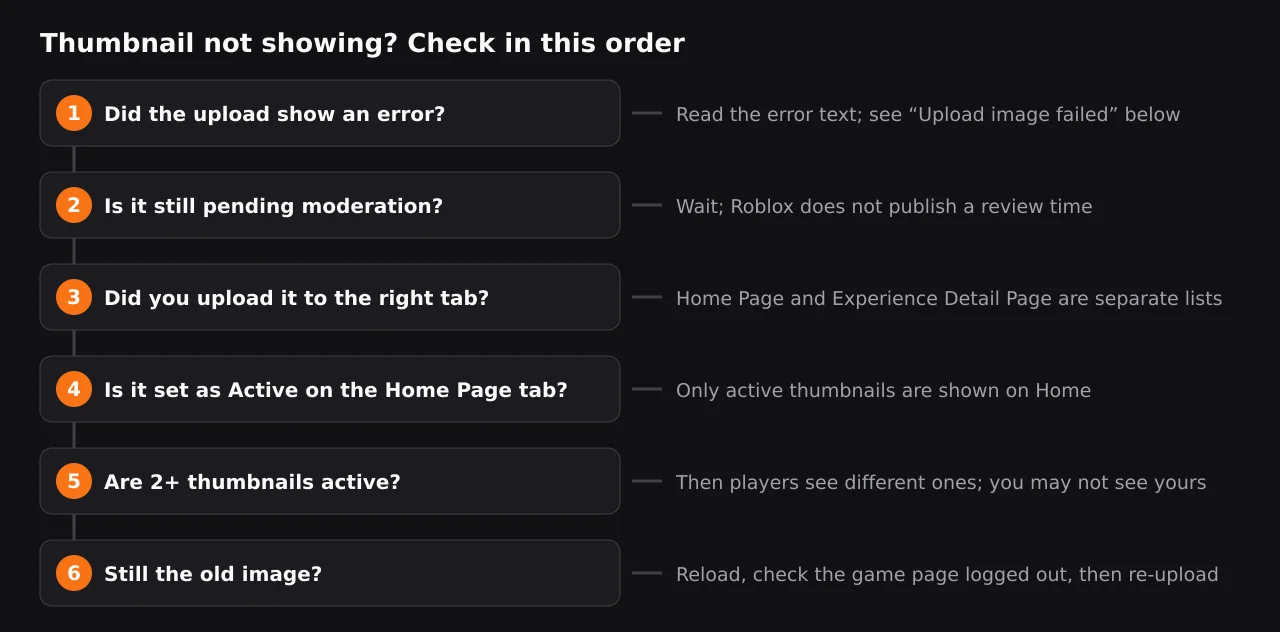
A thumbnail that does not appear is almost always one of six things. The checklist below puts them in the order that finds the cause fastest. Each step is explained underneath, with the exact error text Roblox shows and what each part of it means.
Short answer: check whether the upload failed, whether it is still pending moderation, whether you put it in the right tab (Home Page and Experience Detail Page are separate lists), and whether it is marked Active. If two or more Home thumbnails are active, players see different ones, so you may simply not be seeing yours.
1. The upload failed
When an upload is rejected, the Creator Dashboard shows a dialog. The text developers quoted in Roblox bug reports in 2026 was:
Upload image failed. Thumbnails should be the following formats: .jpeg, .png, .bmp, .webp and not exceed 3MB in size
A later report quoted the list without .webp. Either way, the message covers two separate checks:
| Check | What passes | What to do |
|---|---|---|
| File type | PNG or JPG are the safe choices. Roblox's documentation also lists .gif, .tga and .bmp | Re-export as PNG or JPG. Do not rename a file's extension; save it again from your editor |
| WebP | Blocked. A reply in a Roblox bug report (June 2026) said WebP is no longer allowed and may fail without a clear error | Convert to PNG or JPG. Many editors and AI tools save WebP by default |
| File size | Under 3 MB | Export as JPG at about 85–90% quality. A 1920×1080 JPG is usually well under 3 MB |
If the file passes both checks and still fails, the problem may not be your file. On 7 July 2026 many developers reported this same message for PNG files under 1.9 MB that had uploaded fine before. In another report, a developer found the images had actually been stored under Creations → Development Items → Images even though the dialog said the upload failed. Wait and retry later; if it keeps failing for one game only, report it on the Roblox Developer Forum with the game link and a screenshot.
You can run the format, size and shape checks before uploading with the free thumbnail size checker. It runs in your browser and can export a corrected copy.
2. It is still pending moderation
Every image uploaded to Roblox is moderated before other players can see it. Roblox does not publish how long that takes. Developers report anything from a few minutes to more than a day, and approvals are not always processed in upload order.
While an image is pending you may see a placeholder in its place. There is nothing to fix during this time; uploading the same image again does not speed it up. If an image stays pending for days, or is rejected without a clear reason, contact Roblox Support with the asset ID.
3. It went into the wrong tab
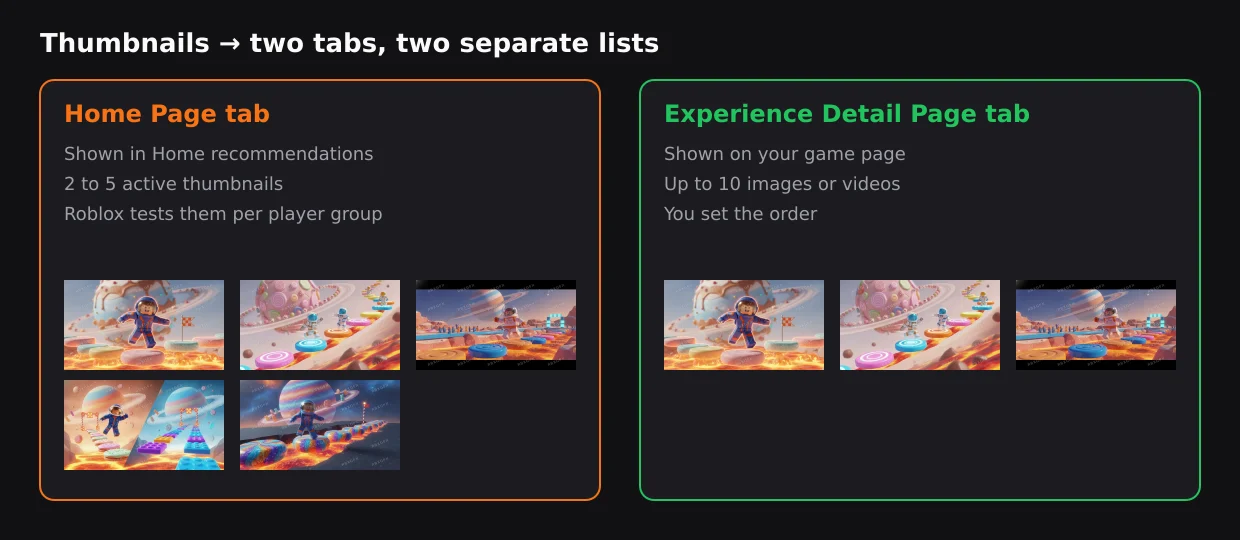
This is the step people miss most often. In the Creator Dashboard, Configurations → Places → (your place) → Thumbnails has two tabs, and each keeps its own list.
| Tab | Where the images appear | Limit |
|---|---|---|
| Home Page | Home recommendations | 2 to 5 active thumbnails for personalization |
| Experience Detail Page | Your game's own page | Up to 10 images or videos, in the order you set |
If you replaced the image on your game page but players still see the old one on Home (or the reverse), you changed the other list. Step-by-step instructions for both tabs are in how to change your Roblox game thumbnail.
4. It is not marked Active
On the Home Page tab, only thumbnails with the Active checkbox enabled are shown. Click Edit active thumbnails, tick the new image, click Save changes, and confirm with Start if Roblox asks to start a new personalization run.
On the Experience Detail Page tab there is no Active switch: the order decides what shows first. Drag the new image to the top.
5. Two or more thumbnails are active
With two or more active Home thumbnails, Roblox runs thumbnail personalization: it shows each thumbnail to different groups of players and sends more impressions to whichever performs better for each group. The image you see on your own Home feed is therefore not proof of what everyone else sees.
To confirm a thumbnail is live, open the Thumbnail Performance table on the Home Page tab. A few hours after activation it starts counting impressions for each thumbnail. A thumbnail with impressions is being shown. How the test works is covered in Roblox thumbnail personalization explained.
6. It still shows the old image
If the upload succeeded, the image is approved, it is in the right tab and active, and you still see the old one:
- Reload the page with the browser cache bypassed, or open the game page in a private window while logged out.
- Check the game page on a different device. Apps and browsers cache images.
- Remove the image from the list and add it again. Developers report this clears a stuck entry.
It shows, but looks wrong
Two problems are easy to mistake for a failed upload.
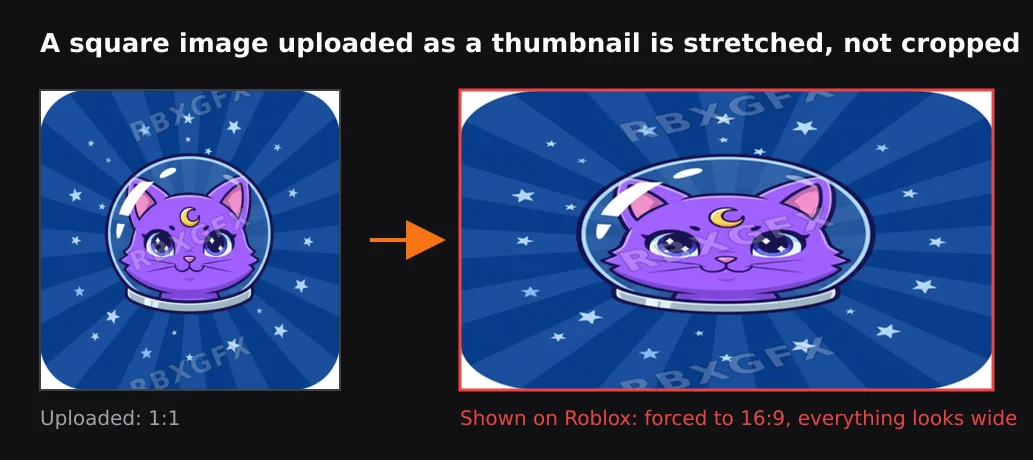
Stretched. Roblox displays thumbnails at 16:9 and stretches any other shape rather than cropping it. A square image becomes wide and distorted:
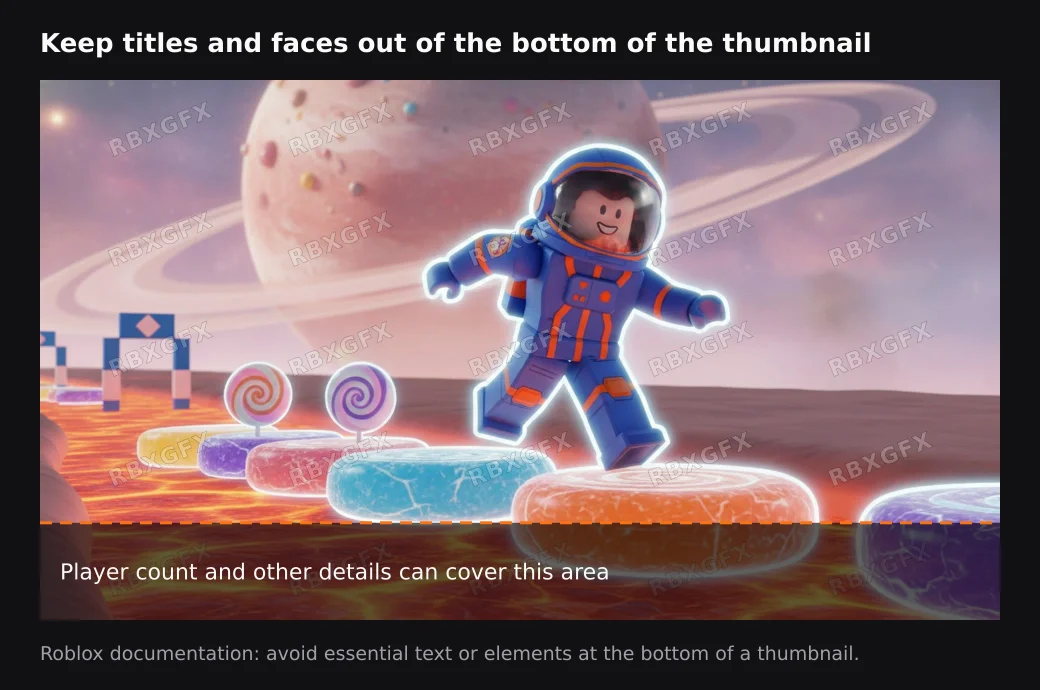
Text hidden at the bottom. Roblox's documentation warns that details such as the player count can cover the bottom of a thumbnail. Titles and faces placed there may disappear behind it.
Prevent it next time
- Export at 1920×1080, PNG or JPG, under 3 MB. The size checker confirms all three and fixes the image if needed.
- Upload new art a day before an update goes live, so moderation is finished when players arrive.
- Put the same new image in both tabs if you want it on Home and on your game page.
- Keep two to five Home thumbnails active and change them with major updates, as Roblox recommends.
If you need several thumbnails to test, the thumbnail maker produces up to five different compositions from one description, already at 1920×1080.
Sources
- Roblox Creator Hub: Experience thumbnails (tabs, formats, 16:9, bottom-of-image note, personalization)
- Roblox Developer Forum bug reports: Experiencing issues with uploading thumbnails (June 2026, error text and the reply about WebP) and Thumbnail Upload image failed Error (July 2026)