Roblox Game Icon, Game Pass or Group Icon Not Showing, Cut Off or Blurry
Fixes for Roblox game icons stuck on pending, game pass and badge icons that are cut off or blurry, and group icons that will not update. With the official size rule for each icon type.
Roblox has four kinds of square icon, and each has its own rule. Most "not showing" problems are moderation or the wrong shape; most "looks bad" problems come from the circle crop and compression. This guide covers all four.
Short answer: all four icons should be square. Game icons need at least 512×512. Game pass images must not exceed 512×512 and are shown in a circle. Badges use a 512×512 template and are also cut to a circle. Roblox publishes no size for group icons; 512×512 is a safe choice. New icons are moderated before players see them.
The rules for each icon
| Icon | Size rule | Shape on Roblox | Formats Roblox lists |
|---|---|---|---|
| Game icon | Square, at least 512×512 | Square | Not stated |
| Game pass | Must not exceed 512×512 | Circle | .jpg, .png, .bmp |
| Badge | 512×512 template | Circle (cropped on upload) | Not stated |
| Group | Not stated by Roblox | Square | Not stated |
The full table with links to each Roblox page is on the icon size page, which also checks your file and exports a corrected copy. Note the difference between game icons and game passes: one is a minimum, the other a maximum. A 1024×1024 file is fine for a game icon but too large for a game pass.
Game icon stuck on pending
Every icon is moderated before other players see it, and Roblox does not publish how long that takes. Developers have reported that during review players can see a pending placeholder instead of an icon, which makes a game look unfinished. Two habits avoid that:
- Upload the new icon a day before the update, not at the moment it goes live.
- Keep the old icon file, so you can switch back quickly if the new one is rejected.
A game shows one icon per language. If you localize your game and the icon does not change for some players, check whether a translated icon is set for their language.
Game pass or badge icon is cut off
Game pass images are shown inside a circle, and the badge upload trims the image into a circle. Whatever sits in the corners of the square file disappears.
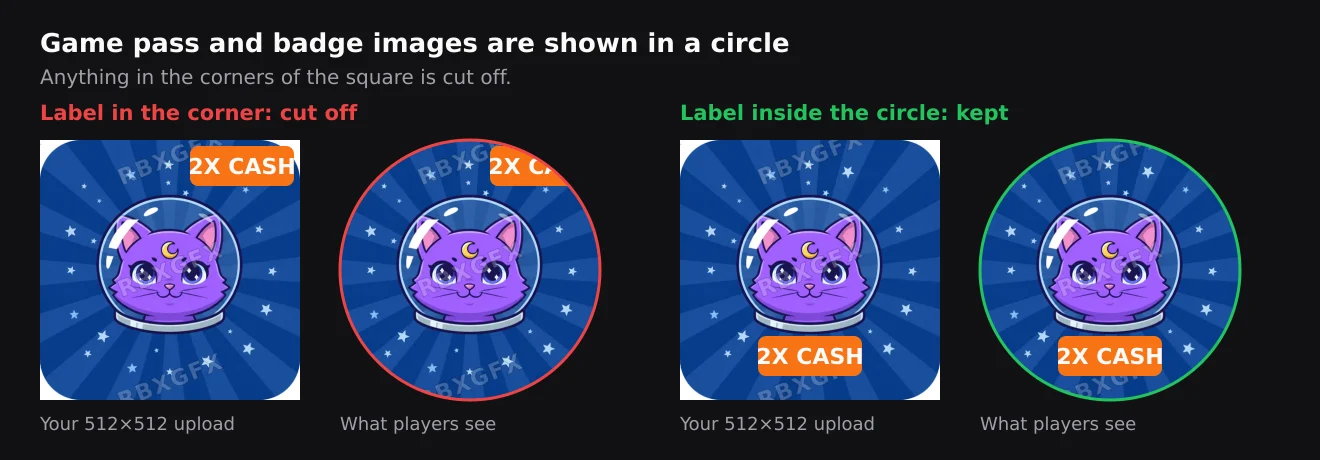
A practical rule: keep everything important inside a circle that touches the four edges of the square, and treat the corners as background. The circle template on the game pass icon maker and the badge icon maker shows exactly that area.
Game pass icon not showing
If the pass page shows a placeholder instead of your image:
- Wait. The image may still be in moderation.
- Check the file against Roblox's rule: .jpg, .png or .bmp, no larger than 512×512. Files exported straight from an editor are often much larger; a 2500×2500 export breaks the rule.
- Re-upload if it was rejected. A rejected image does not come back by itself. If you do not know why it was rejected, remove small text and anything that could be read as a logo or another game's character, then try again.
Icon looks blurry or low quality
Roblox compresses uploaded images, and the icons are shown far smaller than 512 pixels: game pass and badge icons in a store or list, game icons at sizes like 150×150. Detail that looks fine in your editor turns into noise.
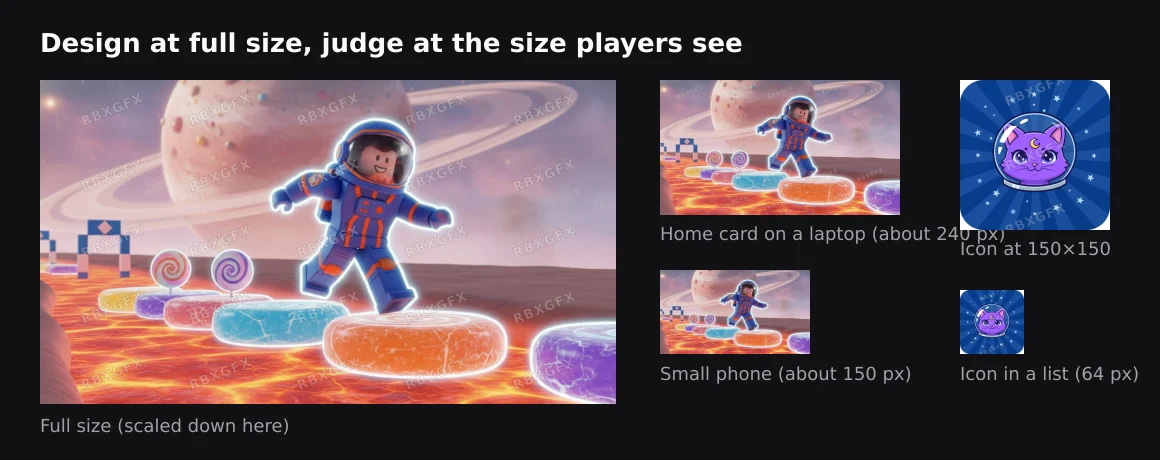
What survives compression and small sizes:
- One subject, large and centered.
- Thick outlines and strong contrast between the subject and the background.
- One or two short words at most, in a heavy font. Developers on the Roblox forum suggest thicker outlines as the main defence against compression.
- Exporting at exactly 512×512 for passes and badges, so Roblox does not resize it again.
Group icon not updating
Roblox's group page only says to upload an image for the group logo. It does not state a size or format. If a new group icon does not appear:
- Wait for moderation. Group icons are reviewed like any other image.
- Check the live page, not your own cached view. Open the group page in a private window or on another device.
- If the upload fails with an unknown error, try again later or from another browser. Developers have reported this error on the forum, and in past cases Roblox fixed it on its side.
Because no size is published, use a square 512×512 PNG. It matches the documented size for game icons and badges, so the same file works in all three places.
Make icons that pass first time
- Use the icon size checker before uploading: it checks the shape, size and format for each icon type, shows the circle crop, and exports a corrected file.
- Download the free square and circle templates on the icon size page.
- If you need the artwork, the game pass icon maker, badge icon maker, group icon maker and game icon maker generate icons composed for each shape.
Sources
- Roblox Creator Hub: Experience icons, Passes, Badges, Groups
- Roblox Developer Forum: Game icon uploads should keep the previous icon until moderation approval, Gamepass icon appears low quality after importing it to Roblox, Why is this gamepass icon not showing?