Best Roblox Thumbnail Makers in 2026, Compared With Real Prices
RBXGFX, RoThumbs, RoVisuals, Ropilot and ForgeGUI compared on what they make, free images, cost per thumbnail, images per request and refunds. Every number taken from each product's own pages.
We make RBXGFX, one of the tools below, so this is not a neutral review. To keep it useful anyway, every fact about another product comes from that product's own website, linked at the end, checked on 20–21 November 2026. We did not buy competitors' plans to rate image quality, so this page compares what can be verified: what each tool makes, what it costs per thumbnail, what you get free and what happens when you want your money back.
Quick picks: RBXGFX for game page art at the lowest cost per thumbnail ($0.083–$0.20) and 5 compositions per request. RoVisuals if you also want UI vectors, logos and 3D models, or want to pay in Robux. Ropilot if you also want an AI assistant inside Roblox Studio and like starting from your game link. ForgeGUI for UI and 3D across several engines with a monthly free allowance. RoThumbs for teams that share projects and credits.
At a glance
| Tool | Best for | Free start | Cheapest paid | Cost per thumbnail | Per request |
|---|---|---|---|---|---|
| RBXGFX | Thumbnails and icons to test | 5 images (watermarked) | $4.99 once | $0.083–$0.20 | 5 |
| RoThumbs | Teams, high resolution | 3 credits | $15.99/month | $0.15–$0.16 at 1K | Not stated |
| RoVisuals | Thumbnails plus UI, logos, 3D; Robux | 2 + 3 credits | $3.99 once | $0.20–$0.67 | Up to 4 |
| Ropilot | Studio assistant plus thumbnails | 1 batch of 4 | $20/month | $0.25 | 4 |
| ForgeGUI | UI and 3D for many engines | 10,000 credits/month | $22/month | Not published | Not stated |
The table scrolls sideways on a phone. Details and sources for each tool are below.
What each tool makes
The five tools overlap only on thumbnails and game icons. Beyond that they are built for different jobs.
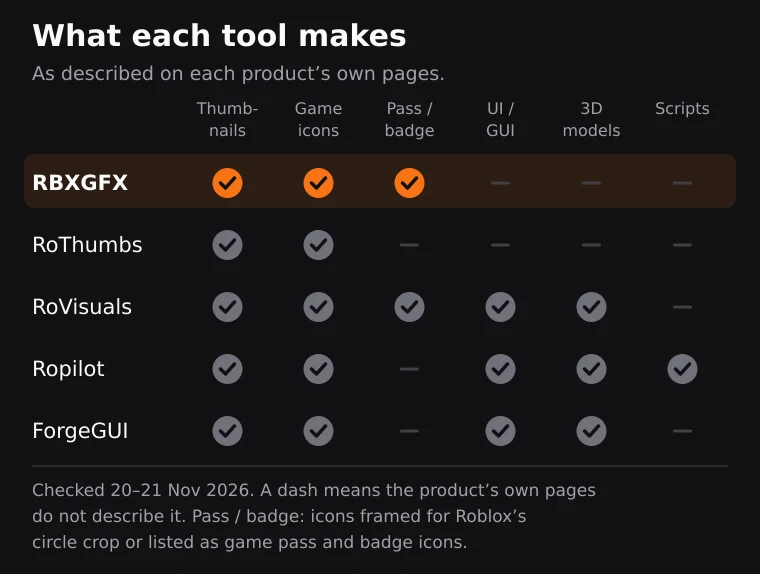
If you only need the art on your game page, a narrow tool is simpler and usually cheaper. If you also need in-game UI, 3D models or code, a broader platform may replace two subscriptions with one.
What one thumbnail really costs
Credits are not comparable between tools: RBXGFX charges 1 credit per thumbnail, RoVisuals 2 or 3, RoThumbs 1 at Basic, HD or 1K and more at 2K and 4K, and Ropilot includes 80 thumbnails a month in its Plus plan. Dividing each plan's price by the thumbnails it buys gives a number you can compare.
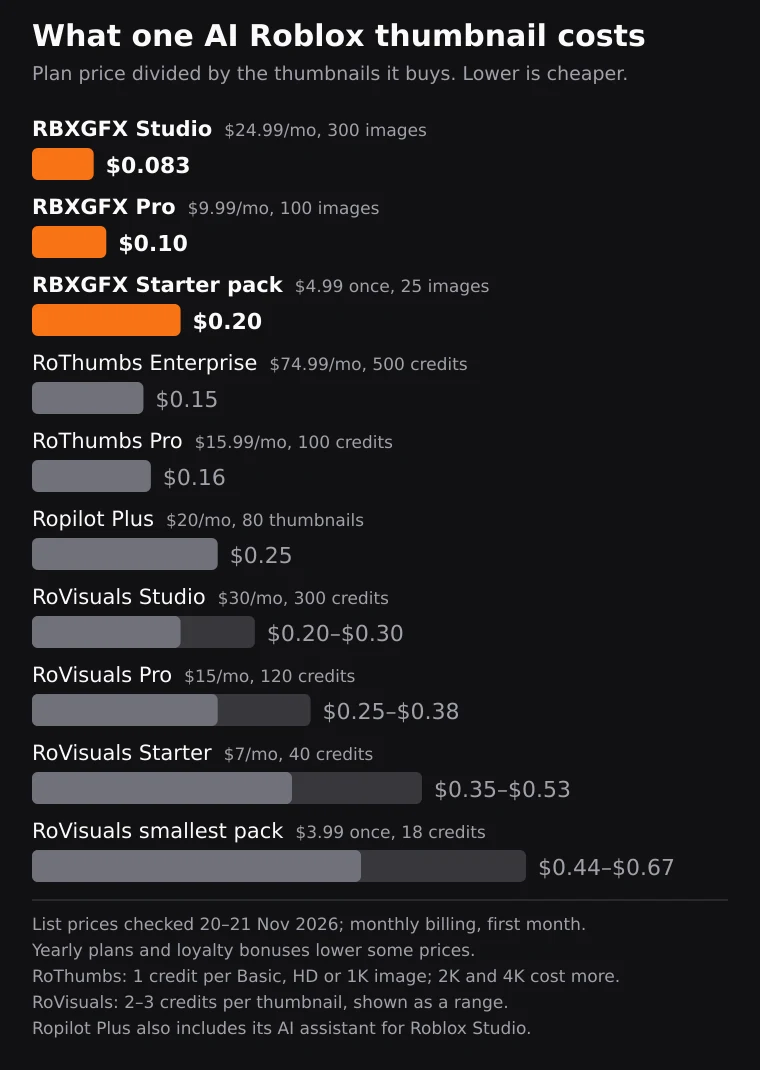
Three caveats:
- RoThumbs at 2K or 4K costs two or four times as much per image.
- Ropilot Plus also pays for its AI assistant in Roblox Studio. If you would buy it for that anyway, its thumbnails are effectively included.
- ForgeGUI does not publish how many credits a thumbnail uses, so it cannot be placed on this chart.
Free images before you pay
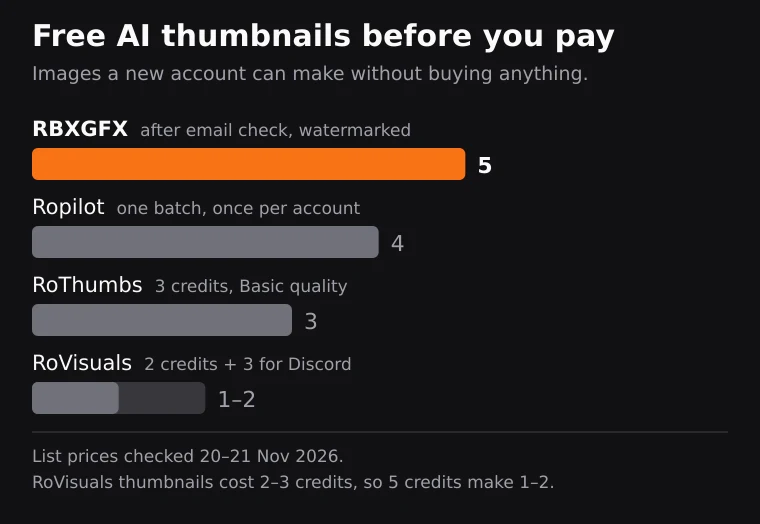
Watch the conditions as well as the number. RBXGFX's free images are watermarked. RoVisuals gives 3 of its 5 free credits only after you verify a Discord account. ForgeGUI's terms say free-credit generations may be added to its public Asset Catalog by default. RBXGFX also shares new sets to its public gallery by default, which you can untick before generating.
Images per request
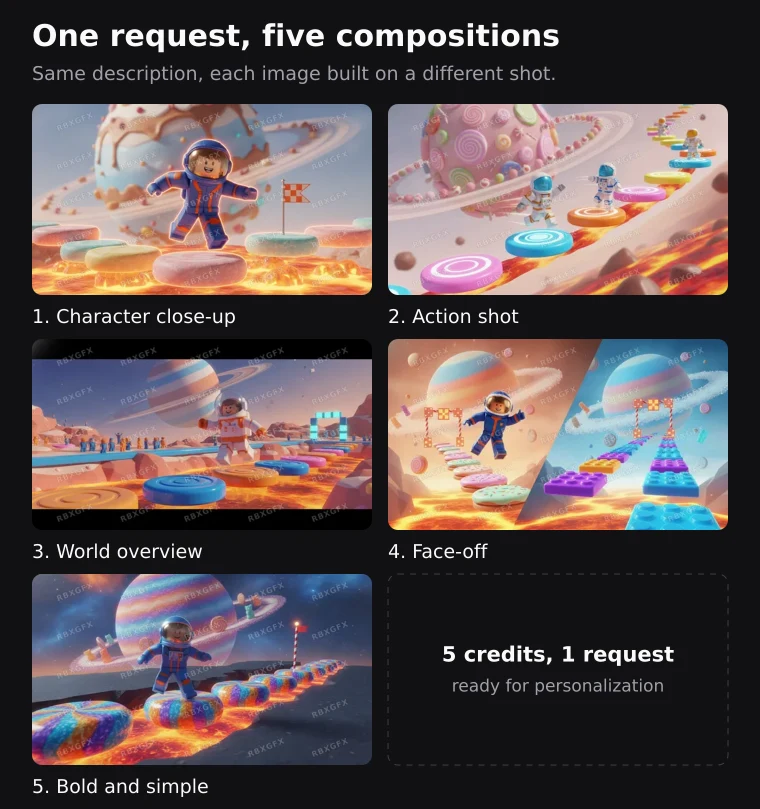
Roblox's thumbnail personalization starts when two or more Home thumbnails are active, and the setup asks for two to five. The more different images one request returns, the faster you get a set worth testing.
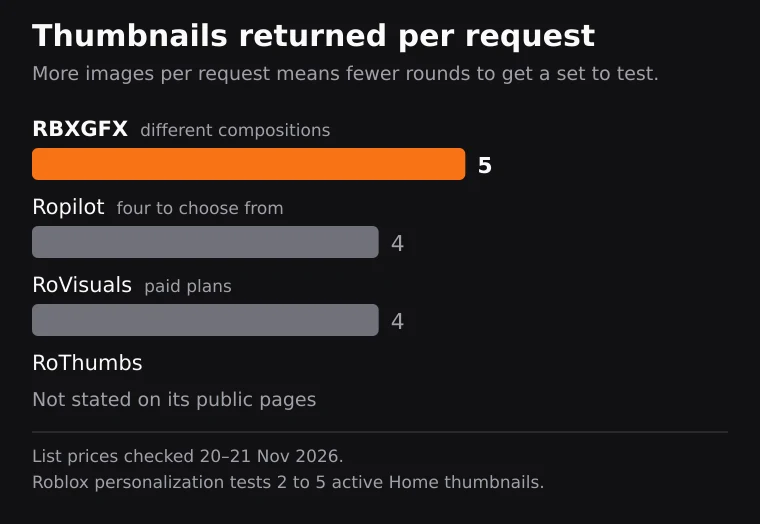
On RBXGFX each of the five is built on a different composition rather than five takes on the same shot:
The tools one by one
RBXGFX
- What it is: a generator for Roblox thumbnails (1920×1080) and icons (512×512): game, game pass, badge, group and logo icons.
- Price: 5 free images after email verification; Starter pack $4.99 once for 25; Pro $9.99/month for 100; Studio $24.99/month for 300. Credits do not expire.
- Best for: developers who need game page art only and want several different thumbnails to test.
- Watch out for: no UI, 3D or code; no Robux payment; no game-link import yet; one reference image per request.
- Refunds: each failed image is refunded automatically; charges made in error are refunded or restored when reported within 14 days.
RoThumbs
- What it is: thumbnails, icons and banners from a text prompt or a gameplay screenshot.
- Price: 3 credits at signup; Pro $15.99/month (100 credits); Enterprise $74.99/month (500 credits), lower when billed yearly.
- Best for: studios that want shared projects (Enterprise includes up to five users) and high-resolution output.
- Watch out for: 2K and 4K cost 2 and 4 credits; no one-time pack on its pricing section.
- RBXGFX vs RoThumbs
RoVisuals
- What it is: thumbnails, 1024×1024 game icons, transparent UI vectors, logos and 3D models, plus a free Update Icon tool and an API on every plan.
- Price: 2 credits at signup plus 3 for verifying Discord; Starter $7, Pro $15, Studio $30 a month (40, 120, 300 credits); packs from $3.99 for 18 credits; Robux accepted.
- Best for: developers who want many asset types in one place, or who pay in Robux.
- Watch out for: a thumbnail costs 2 or 3 credits; its terms say all purchases are final.
- RBXGFX vs RoVisuals
Ropilot
- What it is: an AI assistant that scripts, models and playtests inside Roblox Studio. Its Plus plan includes a thumbnail and game icon maker that can start from your game link.
- Price: one free batch of four; Plus $20/month with 80 thumbnails or icons a month.
- Best for: developers who want the Studio assistant too, or want art built from their existing game page.
- Watch out for: thumbnails come with a $20 subscription; refunds only within 14 days and only if nothing was used.
- RBXGFX vs Ropilot
ForgeGUI
- What it is: a chat-based AI platform for game UI, 3D models, characters and thumbnails across Roblox, UEFN, Unity, Unreal and more, with a Roblox Studio connector.
- Price: Free plan with 10,000 credits a month; Creator $22, Pro $50, Studio $200 a month.
- Best for: developers who need in-game UI and 3D as well as promotional art, on more than one engine.
- Watch out for: credits per thumbnail are not published; watermark removal is a paid feature; paid subscription fees are non-refundable.
- RBXGFX vs ForgeGUI
Before you pay for any of them
When we read the low-star public reviews of tools in this category, the most common complaint was billing, cancelling and refunds (8 of 19 reviews), ahead of image quality (6 of 19). Check these five things on any tool's pricing page:
- One-time or subscription? Know whether the price renews.
- How to cancel, and whether credits survive cancelling.
- Credits per thumbnail at the quality you will use, not just credits per plan.
- What a failed image costs. Some tools refund automatically, some do not say.
- The refund terms. Several say purchases are final.
Then check the output against Roblox's rules before uploading: 16:9 at 1920×1080 for thumbnails, square for icons, and the circle crop for game passes and badges. The free thumbnail size checker and preview tool do this for any image, whichever tool made it.
Free options without AI
If you have time but no budget, you can make thumbnails by hand:
- Blender (free) for rendered scenes of your avatar or map.
- Photopea (free, in the browser) for adding text and effects to screenshots.
- The free PNG size templates on this site, so your canvas starts at the right size.
How to make a Roblox thumbnail without Blender walks through the screenshot route.
Sources
Checked on 20–21 November 2026. Prices change; check the linked page before buying.